Safari Zoo Animals Clipart Bundle: A Practical Guide for Creators
If you are looking to add a touch of the wild to your creative projects, the Safari Zoo Animals Clipart Bundle offers a curated collection designed specifically for digital crafting. Whether you are printing t-shirts, designing mugs, or creating educational materials, having access to high-quality animal graphics is essential. However, navigating the world of digital downloads can be tricky. Many creators rush into purchases without fully understanding file specifications, only to face frustration when their designs fail to print correctly or lose quality during resizing.
This guide cuts through the confusion. We will explore exactly what this bundle provides, highlight common pitfalls that ruin DIY projects, and offer practical advice to ensure your next design looks professional and polished.
Understanding What You Are Getting
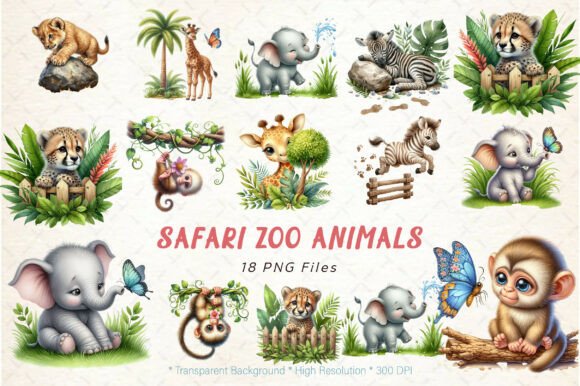
Before diving into your next project, it is crucial to have a clear picture of the assets included in the Safari Zoo Animals Clipart Bundle. This collection features 18 distinct designs of safari animals, rendered in two versatile styles: solid color and distressed effect. These styles allow you to create everything from clean, modern children's room decor to vintage-inspired apparel with a worn-in look.
The technical specifications are where this bundle stands out for serious crafters. Each image is delivered as a PNG file with a transparent background, meaning you can place these animals over any pattern or color without an unsightly white box surrounding them. The resolution is set at 300 DPI (dots per inch), which is the industry standard for high-quality printing. With dimensions of 12″ x 12″ (3600 × 3600 pixels), these files are large enough to scale up for large format prints or down for small accessories like keychains without becoming pixelated or blurry.
Common Mistakes When Choosing Digital Assets
One of the most frequent errors creators make is confusing file formats. Many beginners assume that "clipart" implies vector files like SVGs, which are infinitely scalable. It is important to clarify that this specific bundle is not an SVG file. It consists of raster images in PNG format. While 300 DPI PNGs are excellent for printing, they behave differently than vectors. If you attempt to stretch a PNG beyond its original resolution significantly, you will eventually see pixelation. Understanding this distinction prevents wasted time trying to edit files in software that requires vector paths.
Another overlooked detail is the delivery method. This is a DIGITAL product only. No physical item will be shipped to your door. Some buyers mistakenly expect a CD, USB drive, or printed sheet in the mail. Because the files are delivered in a .ZIP format, users who are not familiar with unzipping archives on a PC or Mac may struggle to access their purchase immediately. This technical hurdle often leads to unnecessary support requests and delays in starting a project.
How File Quality Impacts Your Final Product
The difference between a low-resolution image and a high-resolution one becomes glaringly obvious once you start sublimation or screen printing. Using a low-DPI image on a large surface, such as a tote bag or a pillow, results in a fuzzy, unprofessional appearance that can damage your brand reputation if you are selling these items. The 300 DPI resolution included in this Safari Zoo Animals Clipart Bundle ensures that details—like the texture of a lion's mane or the stripes on a zebra—remain crisp and sharp.
Color accuracy is another area where expectations often clash with reality. Digital screens display colors differently than physical printers. A vibrant green on your monitor might print as a dull olive depending on your printer settings and ink type. This variation is normal, but it is a mistake to blame the file quality before checking your own hardware calibration. High-resolution designs can be resized without losing quality, but they cannot correct for poor printer maintenance or incorrect paper selection.
Practical Steps for Success
To get the most out of your Safari Zoo Animals Clipart Bundle, follow these best practices to avoid common frustrations:
- Test Before You Print: Always do a test print on plain paper first. Check the alignment, color saturation, and clarity before committing expensive sublimation blanks or fabric.
- Master Unzipping: Ensure you know how to extract .ZIP files. On Windows, right-click and select "Extract All." On Mac, double-clicking usually works automatically. Having your files ready to go saves valuable time.
- Check Software Compatibility: Since these are PNGs, they work seamlessly in most graphic design software, including Canva, Photoshop, Illustrator, Cricut Design Space, and Silhouette Studio. They are perfect for layering and adding text.
- Respect the Resolution: While these files are high quality, do not stretch them beyond their logical limits. Use the 12″ x 12″ size as your maximum canvas for optimal sharpness.
Ideas for Your Creative Projects
The versatility of the Solid Color and Distressed Effect styles opens up a wide range of applications. For instance, the solid color versions are ideal for T-shirts and mugs intended for young children, where bright, clean lines are preferred. Conversely, the distressed effect adds character to tote bags and pillows, giving them a rustic, vintage aesthetic that appeals to adult consumers.
These designs are also excellent for sublimation projects. Because of the transparent backgrounds, you can easily combine multiple animals into a single scene or overlay them onto textured backgrounds. Educators can use these high-res images for classroom posters, flashcards, and worksheets, knowing the print quality will hold up under scrutiny. Small business owners can leverage these assets to create cohesive product lines without needing to commission custom illustrations from scratch.
Making an Informed Decision
Before purchasing, take a moment to verify your needs. Ask yourself if you require vector editing capabilities; if so, a PNG bundle might not be the right fit. However, if you need high-quality, ready-to-print images for immediate use in crafts and merchandise, this bundle is a strong choice. Remember that colors may vary slightly depending on your device and printer settings, so always manage your expectations regarding exact color matching.
By understanding the file formats, respecting the resolution limits, and preparing your workspace for digital downloads, you can maximize the value of the Safari Zoo Animals Clipart Bundle. Avoid the common traps of assuming physical delivery or misunderstanding file types, and you will find these assets to be a reliable addition to your creative toolkit.
We are committed to supporting your creativity by providing resources that actually work. Stay inspired by following our store and favoriting your favorite collections to stay updated with new designs added daily. Thank you for supporting independent creativity and taking the time to learn how to use digital tools effectively. Here's to making your next DIY project a success.